


Multi-office asset management means one register where each office manages its own equipment and head office still sees the whole estate. It rests on a location hierarchy, named local custodians, moves recorded on the same asset record, and counts that rotate through sites. Security frameworks such as CIS Controls and ISO 27001 assume all of this.
Multi-office businesses usually end up with one of two broken registers: a central list nobody at the branches uses, or a spreadsheet per office that nobody can add up. Both fail for the same reason. The people who move the equipment aren't the people who own the record.
This piece covers how to fix that: structuring locations, deciding who records what, moving equipment between sites without losing its history, counting an estate spread across cities, and knowing what sits at each address when tax or insurance asks.
What security frameworks already expect
If you answer customer security questionnaires or hold a certification, you've already committed to a hardware inventory that knows what you own and who is responsible for it. None of the common frameworks has a separate rule for multi-site organisations, but each one gets harder to satisfy when equipment lives in several buildings.
|
Framework |
What it asks for |
The multi-site complication |
|---|---|---|
|
An accurate, detailed inventory of all enterprise assets that can store or process data, recording owner and department, reviewed bi-annually or more often |
The review has to reach every office, not only head office |
|
|
Inventories of hardware managed by the organisation are maintained |
'Maintained' means kept current as equipment moves between sites |
|
|
An inventory of information and associated assets, with owners, kept up to date |
An owner at head office can't vouch for a monitor in another city |
|
|
Assets returned when employment, contract or agreement changes |
A leaver at a branch has to hand back to someone local who records it |
None of these tells you how to organise offices. That part is left to you, and it's where most registers go wrong.
Why one flat list gets abandoned
The instinct is to fix fragmentation with a single central list. It rarely works, and the reason is practical rather than political.
An office manager in Leeds doesn't want to scroll past four thousand items in Manchester to find a monitor. Made to, they start a local spreadsheet, and now you have the fragmentation you began with plus a central system nobody updates. I'd go as far as saying that separation is the condition for branch staff using the register at all. Without it, adoption depends on goodwill, and goodwill runs out around the second busy month.
Designing the location hierarchy
|
Level |
Example |
Who works at this level |
|---|---|---|
|
Region |
North America |
Group reporting, tax and insurance |
|
Office |
Austin |
The local office manager, day to day |
|
Floor or area |
Third floor |
Counts and desk moves |
|
Room |
Meeting room 3B |
Finding the thing |
Stackroom models this as nested locations (site, building, room and so on), so filtering by a parent shows everything beneath it. Head office gets a roll-up without anyone collecting spreadsheets, and Austin gets a list that fits on a screen.
Worked example (hypothetical). A firm with offices in Chicago, Austin and London sets up two regions, three offices, the floors in each, and named rooms only where equipment actually lives: meeting rooms, the IT store, the print room. It adds two extra locations per region that aren't buildings: 'In transit' and 'Home working'. That's around thirty locations in total, set up in an afternoon.
Four levels covers almost every office business. I'd resist going deeper, because every extra level is another choice someone has to make each time they register an item, and people stop making it carefully. Agree a naming convention before anyone starts (city first, then floor, then room) and restructuring later stays unnecessary, which matters because moving two thousand filed items is tedious.
Who records what: central versus local
Most of the friction in multi-site registers comes from unclear ownership of tasks. Write it down once.
|
Task |
Local office |
Head office |
|---|---|---|
|
Issue and receive equipment |
Does it, with signatures |
Sees it in the roll-up |
|
Register new arrivals |
Scans and labels on delivery |
Sets categories and required fields |
|
Depreciation settings |
Not involved |
Owns method, useful life and salvage value per category |
|
Counts |
Runs them |
Schedules them and reviews the results |
|
Disposals |
Proposes, with condition notes |
Approves and records the disposal |
|
Reporting |
Its own site |
Value and holdings by site and department |
I'd resist head office approving routine issues. A manager in London waiting on Chicago to sign off a monitor will hand it over anyway and record it later, if at all. Configurable roles let you keep approvals for the things that genuinely need them, such as disposals and high-value items.
Moving equipment between offices without losing history
This is where multi-site registers break most often. A laptop leaves one office, spends a week in a box, and either never appears at the destination or turns up as a new record with no purchase date, no warranty and none of the three repairs it has already had.
The fix is unglamorous. The item keeps one record, and the move is a change to its location and holder, never a deletion at one end and a fresh entry at the other.
- Before it leaves, set its location to the region's 'In transit' location and issue it to the named person responsible for the shipment, usually the sender.
- Note the courier reference as a comment on the asset, so anyone looking for it can follow the parcel.
- On arrival, scan it, return it from the sender with a condition note, set its new location and issue it to the recipient with a signature.
- Once a week, check anything that has sat in 'In transit' for more than a few days. That short list is where equipment disappears between offices.
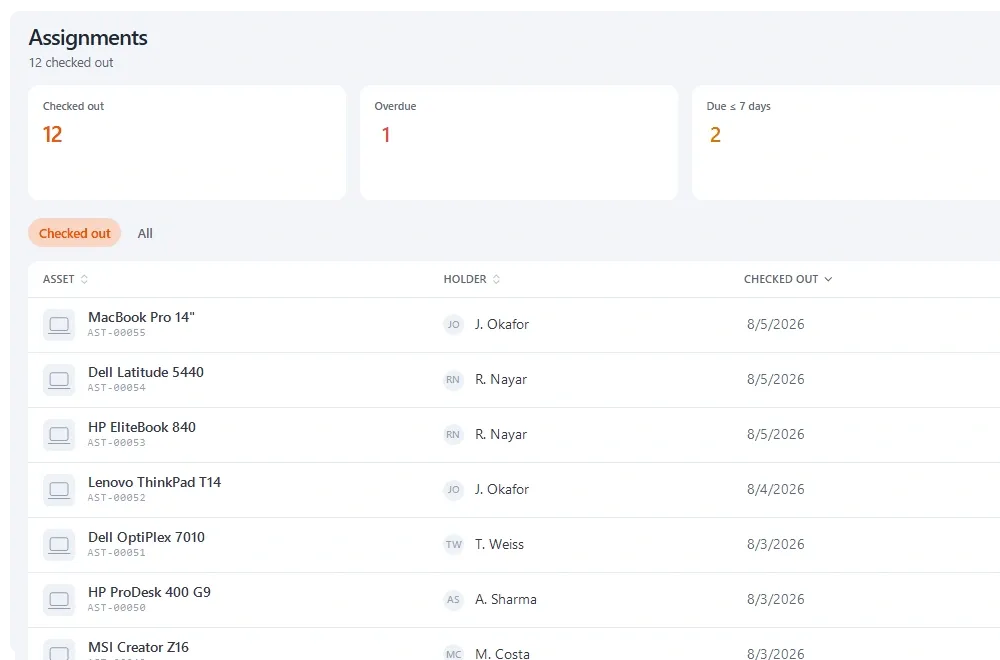
*Every item against a named holder and a date, so equipment moving between offices is always somebody's responsibility.*
The same idea applies to sensitive devices with stricter handling rules. The guide to chain of custody for sensitive equipment covers that in more depth.
Counting across sites
CIS Control 1.1 asks for the inventory to be reviewed at least bi-annually. Across several offices, the practical way to meet that is to rotate scoped counts through the year rather than attempt one group-wide stocktake.
|
Quarter |
Offices counted (hypothetical six-office firm) |
Why this order |
|---|---|---|
|
Q1 |
Head office |
Largest estate; sets the standard for the rest |
|
Q2 |
Austin and Denver |
Two mid-sized offices, one counter each |
|
Q3 |
Head office again, plus London |
Head office counted twice a year to meet the bi-annual review |
|
Q4 |
Manchester, Dublin and the 'In transit' locations |
Year-end check before accounts close |
Two habits make the results credible. The counter shouldn't be the custodian of what they're counting, and it helps to know where a count was actually taken. Stackroom's audits record the location a check was made from, which settles the question of whether someone walked the floor or ticked items off from a desk. The asset audit guide covers scoping and reconciliation.
The reports head office actually needs
Once every office records into the same structure, head office can stop asking for spreadsheets. In practice four views answer most of the questions that reach a finance or IT lead in a multi-site business.
- Value by site. What the equipment at each office is worth today, for tax, insurance and budgeting.
- Holdings by site and department. Who has what, where, which is also the starting point for any leaver or office closure.
- Coverage by site from counts. Which offices have been checked recently and which haven't, so the rotation doesn't quietly skip one.
- Missing at audit, by office. Where items weren't found, which tells you which office needs attention before it tells you anything about individuals.
If one office consistently shows more missing items than the others, look at its process before its people. It usually turns out to be the office without a named local custodian, or the one where moves are recorded after the fact.
Per-site values: tax and insurance
Some obligations depend on what sits at each address. In Texas, House Bill 9 gives an exemption of $125,000 of the appraised value of income-producing tangible personal property at the same location in a taxing unit, effective 1 January 2026. Texas voters approved the constitutional amendment behind it on 4 November 2025, according to the Texas Comptroller. If you have offices in more than one Texas taxing unit, you need to know the value of equipment at each one, not just the company total. Other states handle business personal property differently, so check with your tax adviser.
Insurance often works the same way. If your property cover is scheduled by location, a value-by-site report from the register gives you the renewal figures without anyone emailing office managers for estimates.
Office moves, openings and closures
Moves
A relocation is the best chance you'll get to correct the register, because every item is being physically handled anyway. Scan as it's packed and scan as it's unpacked, and you finish the move with an accurate register and the count you'd been postponing done along the way. Many organisations do the opposite and suspend the register during the move. It is the most expensive shortcut in this whole topic, because the register rarely gets fully restored.
Openings
|
Opening task |
Effort |
What it prevents |
|---|---|---|
|
Create the office, floors and rooms in the hierarchy |
Minutes |
Equipment filed nowhere sensible |
|
Register equipment as it arrives |
As it happens |
Reconstructing the register from invoices a year later |
|
Name a local person who can issue and receive |
A conversation |
Records made remotely by people who weren't there |
|
Run a count in the first month |
An hour or two |
Discovering later what the fit-out actually left behind |
Closures
Closing an office is where equipment vanishes most easily. Staff are leaving or relocating, the lease end date is fixed, and nobody is thinking about the register.
- Count the office before the closure is announced widely, so you have a baseline.
- Recover equipment from people who are leaving through your normal offboarding process, not a last-day scramble.
- Decide each item's destination (another office, storage, resale or disposal) and record it as a move or a disposal on the same record.
- Close the location only when nothing is left assigned to it.
Remote staff are another site
For most multi-office firms, the largest 'office' is now people's homes. Treat home working as its own location under each region, with every item issued to a named person. The hybrid and remote working page covers the setup, and the guide to remote employee equipment returns deals with getting kit back from people you'll never see in person.
Where to start
- Agree the location hierarchy and naming convention before registering anything else.
- Name one person per office who can issue and receive equipment.
- Write down which tasks are local and which are central.
- Create 'In transit' and 'Home working' locations per region.
- Schedule rotating counts so every office is covered at least once a year, and the inventory as a whole is reviewed as often as your framework requires.
- Put registration on the checklist for every office opening, move and closure.
- Publish an equipment policy that applies across all sites, so new offices inherit it rather than inventing their own.
If you'd like to see this set up in a working register, the multi-office page shows how Stackroom handles locations, local custody and per-site reporting across a group of offices.
Sources
- CIS Controls v8.1 Safeguard 1.1: Establish and Maintain Detailed Enterprise Asset Inventory — CSF Tools / Center for Internet Security
- NIST CSF 2.0 ID.AM-01: Inventories of hardware managed by the organization are maintained — CSF Tools / NIST
- ISO 27001:2022 Annex A 5.9 Inventory of Information and Other Associated Assets — ISMS.online
- ISO 27001:2022 Annex A 5.11 Return of Assets — ISMS.online
- H.B. 9, 89th Legislature, enrolled version — Texas Legislature, 2025
- Property Tax Today, January 2026 — Texas Comptroller of Public Accounts, 2026
Key takeaways
- A single flat register gets abandoned at branch level, which recreates the fragmentation you were trying to fix.
- Build a four-level location hierarchy once, with a naming convention, before registering anything else.
- Record moves between offices on the same asset record, via an 'In transit' location and a named holder, never by delete-and-recreate.
- Rotate scoped counts through offices so every site is reviewed at least as often as frameworks like CIS Control 1.1 expect.
- Know equipment value per site: some taxes, such as Texas's per-location exemption, and many insurance schedules depend on it.
Frequently asked questions
How do you manage assets across multiple office locations?
Use one register with a location hierarchy (region, office, floor, room) so each office manages its own equipment while head office sees the whole estate. Name a local person at each site who issues and receives equipment with signatures, record moves between offices on the same asset record, and rotate scoped counts through the sites during the year.
Can each office see only its own equipment?
Yes, if the system supports departments, hierarchical locations and configurable roles. Each office works with a list that fits on a screen, and head office keeps a consolidated view across all sites. Without that separation, branch staff tend to drift back to local spreadsheets, which recreates the problem the central register was meant to solve.
How should equipment moving between offices be recorded?
As a change to the existing asset record, never as a deletion at one site and a new entry at another. Set the item to an 'In transit' location, issue it to the person responsible for the shipment, note the courier reference, and on arrival return it from the sender and issue it to the recipient. History, warranty and repair records stay intact.
How often should a multi-site business count its equipment?
Often enough to meet whatever framework you follow. CIS Control 1.1, for example, asks for the enterprise asset inventory to be reviewed bi-annually or more often. Across several offices, the practical approach is a rotating schedule of scoped counts by site, with the largest offices counted more often, rather than one annual group-wide stocktake.
Why does equipment value per location matter?
Some taxes and insurance policies are calculated by location. In Texas, for example, House Bill 9 gives a $125,000 exemption for income-producing personal property at the same location in a taxing unit from 1 January 2026, so you need per-site values. Property insurance scheduled by location also needs current values for each office at renewal.
How should we structure locations across regions?
Region, office, floor or area, and room covers almost every office business. Add named rooms only where equipment actually lives, and create 'In transit' and 'Home working' locations per region. Agree a naming convention before registering anything, because restructuring a hierarchy after thousands of items are filed into it is slow and error-prone.