
Equipment tracking & checkout
Stackroom vs Reftab
Reftab is a clean, sensibly priced asset tracker that IT teams like for hardware checkout and assignment. Stackroom covers the same ground and extends past IT into shared field equipment, bookings, maintenance and audits.
Stackroom vs Reftab: which should you choose?
Reftab is the better choice for a small IT team that wants straightforward hardware checkout and loan tracking at a low price. Stackroom is the better choice when the register has to cover field equipment as well as laptops, and when bookings, maintenance and signed audits matter.
Side by side
Stackroom vs Reftab: pricing, limits and features
Grouped so you can jump to the part you care about. Our figures come from our billing API, so they match the invoice.
Pricing & plans
Free plan
- Stackroom
- Free forever — 250 assets, 500 people, unlimited users, no card
- Reftab
- 50 assets, free forever. Accessories and licences do not count against the quota.
Paid plans start at
- Stackroom
- $0/mo for Starter — published, self-serve
- Reftab
- Hardware asset management is a flat figure in the low hundreds per month; complete ITAM is quoted on assets plus software users.
How the bill scales
- Stackroom
- Capability and capacity — never headcount, never how much you track
- Reftab
- Module and asset volume. Hardware asset management is a flat monthly price with unlimited users; software asset management is charged per tracked software user per year.
Limits
Asset limits
- Stackroom
- 250 free, up to 10,000 on Premium, custom on Enterprise
- Reftab
- 50 free forever · paid caps not published on the pricing page
Users & seats
- Stackroom
- Unlimited on every plan, including Free — seats are never the meter
- Reftab
- Unlimited on the hardware plan
Locations & sites
- Stackroom
- 1 on Free, unlimited on every paid plan
- Reftab
- Not published
How each tool is set up
Unlimited users
- Stackroom
- Yes
- Reftab
- On the hardware plan
What each tool covers
Beyond IT equipment
- Stackroom
- Any asset type
- Reftab
- IT-oriented
Custody & accountability
Hardware checkout & loans
- Stackroom
- Yes
- Reftab
- Its strength
Signed handover & return
- Stackroom
- Yes
- Reftab
- Loan agreements
Asset clearance certificate for leavers
- Stackroom
- Yes
- Reftab
- No
Signed webhooks with retries
- Stackroom
- 41 events, HMAC-signed, retried
- Reftab
- Not stated on their pricing page
Audits & compliance
Scoped cycle-count audits
- Stackroom
- Yes
- Reftab
- Basic
Maintenance & service
AMC / CMC service contracts
- Stackroom
- Yes
- Reftab
- Warranty dates
Maintenance tickets with cost & history
- Stackroom
- Yes
- Reftab
- Limited
Finance & lifecycle
Depreciation (SLM / WDV) & book value
- Stackroom
- Yes
- Reftab
- Limited
Report library
- Stackroom
- 62 templates
- Reftab
- Standard reports
Tracking & tagging
Geo scan map & per-asset trail
- Stackroom
- Yes
- Reftab
- No
Platform, API & AI
REST API
- Stackroom
- Documented, with a published OpenAPI spec
- Reftab
- Not stated on their pricing page
Built-in AI assistant
- Stackroom
- Stackroom AI, role-scoped
- Reftab
- Not stated on their pricing page
| Capability | Stackroom | Reftab |
|---|---|---|
| Pricing & plans | ||
| Free plan | Free forever — 250 assets, 500 people, unlimited users, no card | 50 assets, free forever. Accessories and licences do not count against the quota. |
| Paid plans start at | $0/mo for Starter — published, self-serve | Hardware asset management is a flat figure in the low hundreds per month; complete ITAM is quoted on assets plus software users. |
| How the bill scales | Capability and capacity — never headcount, never how much you track | Module and asset volume. Hardware asset management is a flat monthly price with unlimited users; software asset management is charged per tracked software user per year. |
| Limits | ||
| Asset limits | 250 free, up to 10,000 on Premium, custom on Enterprise | 50 free forever · paid caps not published on the pricing page |
| Users & seats | Unlimited on every plan, including Free — seats are never the meter | Unlimited on the hardware plan |
| Locations & sites | 1 on Free, unlimited on every paid plan | Not published |
| How each tool is set up | ||
| Unlimited users | Yes | On the hardware plan |
| What each tool covers | ||
| Beyond IT equipment | Any asset type | IT-oriented |
| Custody & accountability | ||
| Hardware checkout & loans | Yes | Its strength |
| Signed handover & return | Yes | Loan agreements |
| Asset clearance certificate for leavers | Yes | No |
| Signed webhooks with retries | 41 events, HMAC-signed, retried | Not stated on their pricing page |
| Audits & compliance | ||
| Scoped cycle-count audits | Yes | Basic |
| Maintenance & service | ||
| AMC / CMC service contracts | Yes | Warranty dates |
| Maintenance tickets with cost & history | Yes | Limited |
| Finance & lifecycle | ||
| Depreciation (SLM / WDV) & book value | Yes | Limited |
| Report library | 62 templates | Standard reports |
| Tracking & tagging | ||
| Geo scan map & per-asset trail | Yes | No |
| Platform, API & AI | ||
| REST API | Documented, with a published OpenAPI spec | Not stated on their pricing page |
| Built-in AI assistant | Stackroom AI, role-scoped | Not stated on their pricing page |
Honest take: Reftab leads on simplicity and value for IT hardware checkout. Stackroom leads on breadth beyond IT and on the workflows around the register.
Reftab capabilities verified September 2026 · plan facts read from their pricing page , September 2026. Spotted something out of date? Tell us.
Plan gating
Which tier unlocks what
What you have to be paying for before each capability is available.
- CSV importStarter and up
- Barcode & QR scanningStarter and up
- Bookings & reservationsStarter and up
- Maintenance & serviceStarter and up
- Cycle-count auditsGrowth and up
- Report libraryGrowth and up
- Custom fieldsGrowth and up
- Stackroom AIFree and up
- REST APIGrowth and up
- Signed webhooksGrowth and up
- Custom rolesGrowth and up
- Google / Microsoft SSOFree and up
- Software asset management is a separate, per-software-user charge on top of hardware
Reftab is competitively priced and its hardware plan does not charge per user, so seats are not the difference here. The difference is scope: what the register covers and the workflows around it.
The difference
What Stackroom and Reftab are each built to do
Reftab is good at the thing it is for
There is a version of this comparison that is genuinely close. If you are an IT team with a few hundred laptops, monitors and phones, and your problem is knowing who has what and generating a loan agreement when you hand something over, Reftab does that cleanly and inexpensively. It is a sensible product and it is priced sensibly.
The reason to look further is almost always scope. IT asset tools are shaped around a device estate: things bought by IT, assigned to an employee, held for years, returned at offboarding. That is a real shape and a common one.
Where the shape breaks down
The shape stops fitting when equipment is shared rather than assigned. A laptop belongs to a person; a thermal camera belongs to whoever booked it this week. Shared equipment needs availability, reservations and overlap checks, because the failure mode is two people planning around the same item.
It also stops fitting when equipment needs servicing on a schedule rather than being replaced on a cycle. IT hardware is usually refreshed; field equipment is usually maintained, inspected and certified. A maintenance ticket with a status, a cost and an expected return date is a different object from a warranty date.
And it stops fitting when the register has to cover things IT did not buy — the tools in the van, the instruments in the lab, the staging in the AV store. Stackroom is built to hold all of it in one register, with departments so each team manages its own without seeing everyone else's.
If you are IT and staying IT
Then be careful about over-buying. Stackroom's IT asset management solution covers device assignment, offboarding recovery and warranty tracking properly, and the free tier means you can check it. But if Reftab already does what you need at a price you are happy with, the honest advice is to stay.
The trigger to move is usually organisational rather than technical: facilities or operations asks whether they can use your asset system too, and the answer with an IT-shaped tool is “not really”.
Why teams switch
What we hear from teams leaving Reftab
Another department wanted in
Once facilities, labs or AV ask to use the asset system, an IT-shaped tool starts to strain and you end up running parallel registers.
Shared gear needed reservations
Assignment works for a laptop that belongs to one person. It does not work for equipment several teams need on different days.
Field equipment needed servicing, not refresh
IT hardware is replaced on a cycle; instruments and tools are maintained, inspected and certified. That needs maintenance tickets and schedules, not just a warranty date.
The other side
When Reftab is the better choice
We would rather you picked the right tool than picked ours.
- Your register is IT hardware and will stay IT hardware.
- You want the lowest reasonable price for straightforward checkout and loan agreements.
- Your register is under 50 assets, and Reftab's free-forever plan covers it.
- You do not need maintenance tickets, cycle-count audits or a location trail.
Switching
Moving from Reftab
- 1
Export from Reftab
Take a full CSV export of your asset list, including serial numbers, categories, locations and any custom fields you rely on — if Reftab only offers XLSX, save it as CSV, because that is what the importer reads. Export your people list separately if Reftab keeps one.
- 2
Map the columns once
The importer previews your file and lets you map each column to a Stackroom field. Categories, locations and departments are created from the values in your file, so you do not build the hierarchy by hand first.
- 3
Import people, then assets
Loading people first means custody assignments resolve to a real person on the asset import rather than needing a second pass.
- 4
Check a sample, then go
Spot-check twenty records against the old system before you invite the team. Re-importing is safe — matching on an existing code updates rather than duplicates.
Nothing is deleted from Reftab by importing into Stackroom, so you can run both in parallel for a week while people get used to the change.
FAQ
Questions, answered
Is Stackroom overkill for an IT-only estate?
Possibly. If your needs are device assignment and loan agreements and nothing more, Reftab is a good fit at a good price. Stackroom earns its place when the register widens beyond IT or when bookings, maintenance and audits enter the picture.
Can Stackroom handle employee offboarding?
Yes. Everything a person holds is listed on their record, so recovery is a checklist rather than a search, and once it is all back Stackroom emails a branded asset clearance certificate for the leaver.
Do you support loan agreements?
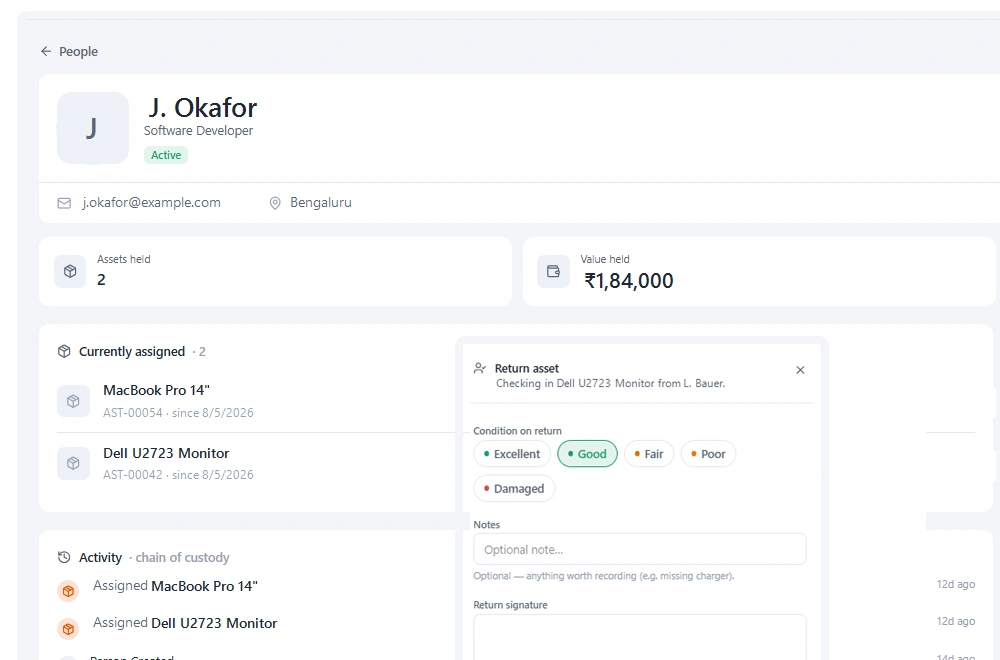
Stackroom captures the equivalent evidence rather than a generated document: the handover takes a signature on the device, the holder can acknowledge receipt, and the return takes another signature with a condition record, all stored on the custody history.
Can different departments keep their equipment separate?
Yes. Departments and configurable roles let each team manage its own equipment inside one organisation, which is usually what makes a shared register acceptable to everyone.
Can we import our data from Reftab?
Yes. Export your inventory to CSV and import it into Stackroom. Categories, locations and custom fields map across, and our team will help with the awkward parts of a larger migration.
How long does switching actually take?
Most teams import in the morning and run a real checkout the same afternoon. There is no implementation project and no professional services fee. The longest part is usually relabelling, and that can be done gradually.
Do we have to relabel everything?
No. If your existing labels carry a code you already track, import that code and keep using them. New QR labels can be printed on standard address stock as and when you need them.
Is Reftab free?
50 assets, free forever. Accessories and licences do not count against the quota. Stackroom's free plan is permanent rather than a trial, includes unlimited users, and needs no card.
How is Reftab priced compared with Stackroom?
Module and asset volume. Hardware asset management is a flat monthly price with unlimited users; software asset management is charged per tracked software user per year. Stackroom prices on capability and capacity instead: users are unlimited on every plan, and tracking more equipment never moves the bill on its own.
What are the Reftab asset and user limits?
Assets: 50 free forever · paid caps not published on the pricing page. Users: Unlimited on the hardware plan. Locations: Not published. Every Stackroom limit is published on our pricing page and served from our billing API, so it matches your invoice.
Other comparisons
Looking at something else?
Outgrowing Reftab?
Import your data, print a sheet of labels, and run a real checkout the same day.