


Professional services firms hold confidential client data on portable devices, and rules such as ABA Model Rule 1.6(c), the FTC Safeguards Rule, the SRA codes and UK GDPR expect reasonable safeguards. Asset management for these firms means proving who held each device on a given date, whether it was encrypted, and that it came back.
If you look after equipment at a law, accounting or consulting firm, the hard question is rarely what you own. It's who had a particular laptop on a particular date, and whether you can prove it.
That question tends to arrive after a device has gone missing, from a partner, a client or an insurer. A register that stores only the current holder can't answer it, because every handover overwrote the name before. This guide covers what US and UK confidentiality rules expect around devices, what a custody record needs to contain, what to do in the first hour after a loss, and how to recover equipment from people who leave.
What the rules say about devices holding client information
None of the main rulebooks tells you to keep an asset register in so many words. They require reasonable safeguards for client information, and after an incident they ask you to show what those safeguards were. Knowing which device was where, with whom, is one of the cheapest safeguards to evidence.
|
Rule or guidance |
Who it applies to |
What it means for equipment |
|---|---|---|
|
US lawyers, through each state's version of the Model Rules |
Make reasonable efforts to prevent unauthorised access to client information. A laptop nobody can locate is hard to describe as a reasonable effort. |
|
|
ABA Formal Opinion 477R (2017) |
US lawyers |
Security should match the sensitivity of the matter, and lawyers should understand which laptops, phones and tablets the work happens on. |
|
ABA Formal Opinion 483 (2018) |
US lawyers |
After a breach: stop it, investigate, and notify affected clients. Not every lost device is a breach, which is precisely what your records have to establish. |
|
AICPA Confidential Client Information Rule (1.700.001) |
US CPAs in public practice |
No disclosure of confidential client information without the client's specific consent. |
|
US tax preparation firms and other covered financial institutions |
Keep an accurate list of systems, devices, platforms and personnel; encrypt customer information; notify the FTC within 30 days of a breach of 500 or more consumers' unencrypted information. |
|
|
Solicitors and law firms in England and Wales |
Keep the affairs of current and former clients confidential, with arrangements in place that make that possible. |
|
|
Any UK firm processing personal data |
A lost or stolen device holding personal data is a breach to assess. Notifiable breaches go to the ICO within 72 hours, and every breach is documented. |
Opinion 483 deserves a closer read if you're at a US law firm. The ABA's opinion, issued in October 2018, makes clear that not every lost or stolen device amounts to a data breach, and suggests that lacking measures such as the ability to locate and lock down portable devices could be considered unreasonable. Both points depend on records. You can't decide whether a missing laptop exposed client data until you know which laptop it was, who had it and whether it was encrypted.
Accounting and tax firms have a more explicit rule. The FTC's guidance on the Safeguards Rule lists tax preparation firms among covered financial institutions and tells them to keep an accurate list of all systems, devices, platforms and personnel. The IRS reminds tax professionals that a written data security plan is a federal requirement rather than a nice idea.
In the UK, solicitors answer to paragraph 6.3 of both SRA codes, and the SRA's confidentiality guidance names encryption and password protection among the measures that make information barriers work. Every firm, legal or not, also answers to the ICO, whose guide to personal data breaches lists computing devices containing personal data being lost or stolen as a breach type. Notifiable breaches must be reported within 72 hours of becoming aware, and Article 33(5) requires you to document the facts, effects and remedial action even for breaches you don't report.
Encryption changes the picture considerably. The ICO's internal guide to assessing breach reports lists the loss of encrypted devices, where another copy of the data exists, among cases its staff could usually close immediately. So the first practical question after a loss is which device it was and whether it was encrypted, and the asset record is the natural place for that answer to live.
The risk isn't theoretical. In the ABA's 2023 Cybersecurity TechReport, 29% of responding firms said they had experienced a security breach, and only 34% reported having an incident response plan.
Why a current-holder field isn't enough
Most registers, spreadsheets included, store one name per device. When a laptop passes from an associate to a trainee, the associate's name disappears. Six months later a client asks whether any device holding their files was ever unaccounted for, and your record can only tell you where it is today.
A custody record works the other way round. Each handover adds an entry with a date, so the history builds up instead of being replaced. Here's what that record should hold, and why each part gets asked for.
|
Element |
Why you'll be asked for it |
|---|---|
|
Named individual |
Accountability needs a person who can be asked |
|
Date of issue |
Sets the start of their period of responsibility |
|
Evidence of acceptance |
A signature or acknowledgement, not just an assertion that it was assigned |
|
Condition at issue |
Separates later damage from wear that was already there |
|
Encryption and management status |
The first question in any breach assessment |
|
Full holder history |
Answers questions about a past date |
|
Closure on return |
Shows when the period ended, and in what condition the device came back |
Most firms already have the first two. Evidence of acceptance is what turns a record into evidence, and the full history is what makes a question about last March answerable. Encryption status is easy to add as a custom field, and it saves a frantic hour on the day something goes missing.
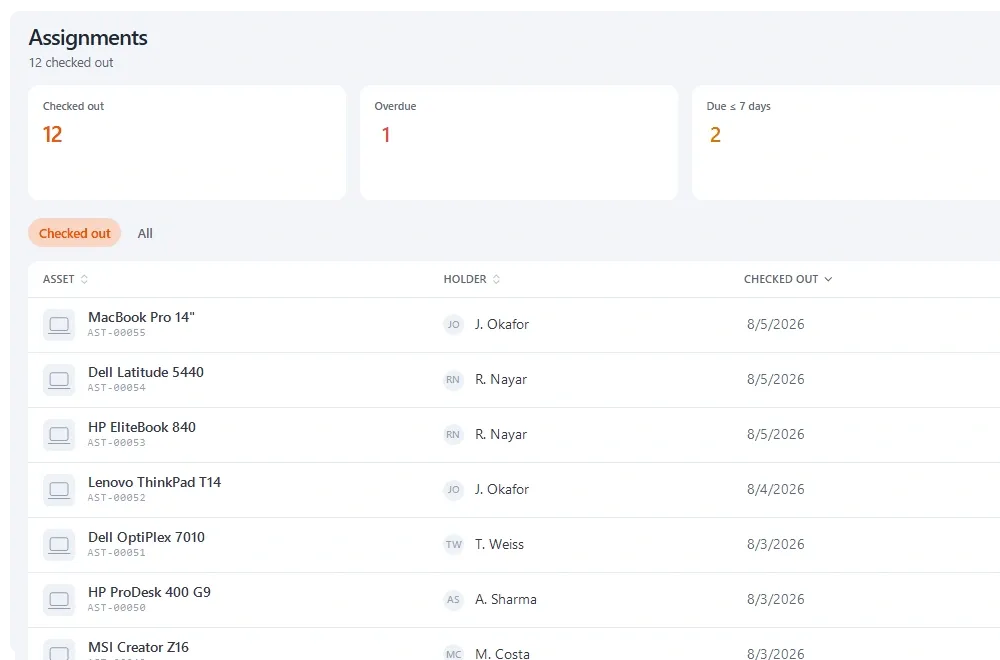
*Every device against a named holder with a date, and the chain kept rather than overwritten.*
When a device goes missing: the first hour
You don't want to design this on the day. The sequence below is a starting point to adapt with your general counsel or compliance lead. It assumes your IT team or provider handles remote lock and wipe through whatever device management tool you already use.
- Identify the device exactly. Asset tag, serial number and model. 'Priya's laptop' isn't precise enough if Priya has had three.
- Pull the custody history. Who held it, from when, and who had it before. If it lived in a meeting room or a spare pool, record that.
- Confirm encryption and lock status, first from the record and then from your management console.
- Mark it lost or stolen without clearing the holder, so the record still shows who was responsible when it went.
- Start the clocks that apply to you. 72 hours for a notifiable UK breach, 30 days for an FTC notification event, and client notification duties under your professional rules.
- Write the timeline as you go. The ICO expects every breach documented, and your insurer and clients will want the same sequence of events.
Step four is where a lot of systems let you down. If marking a device lost simply empties the holder field, you've erased the most important fact at the moment you need it. In Stackroom, a custody closed as lost or stolen keeps the holder on the record for exactly this reason.
For the wider practice of documenting handovers on sensitive kit, the guide to chain of custody for sensitive equipment goes into more detail.
Offboarding fee earners and staff
ISO 27001 sets the expectation plainly. Annex A control 5.11 asks that personnel return all organisational assets when their employment, contract or agreement changes. If your firm is certified, or answers client security questionnaires modelled on the standard, you'll be asked to show how that happens.
Professional services firms find it harder than most. Notice periods are long, people often leave for a competitor or a client, and nobody wants to spend a departing partner's last week asking about a docking station. So it doesn't get asked, and the equipment stays where it is.
- Generate the list at the start of the notice period, from the person's custody record, not from memory in their final week.
- Make it administrative. Run it alongside access revocation and file returns, handled by operations rather than the person's partner or manager. People rarely argue with a checklist.
- Check items in one at a time with a condition note, rather than closing everything in bulk.
- Close with a clearance record. Stackroom can email a no-dues clearance certificate once nothing is outstanding, which also helps when someone later asks whether client data left with the device.
The onboarding and offboarding equipment guide covers the full sequence, and an employee equipment agreement signed at joining makes the return expectation explicit from day one.
Accessories: low risk, real money
Docks, monitors, headsets and chargers rarely hold client data, so they sit low on the security list. They still matter, because they're what quietly stays behind when people move desks, work from home or leave.
Worked example (hypothetical prices). Say an 80-person firm gives each fee earner a dock at $250, two monitors at $200 each and a headset at $100. That's $750 a head, or $60,000 across the firm, none of which shows up if your register only lists laptops. Your own figures will differ; the point is to price it once so you know whether the accessories are worth recording individually.
A sensible rule is to register anything above a set value or anything that leaves the building, and count the rest by location.
Practice groups, offices and client sites
Firms are rarely one flat organisation. Practice groups want to manage their own kit, regional offices have their own office managers, and consultants spend months on client premises. Departments and configurable roles let each group run its own part of the register while operations keeps one firm-wide view.
|
Equipment |
Tracking model |
A reasonable check |
|---|---|---|
|
Fee earner laptops and phones |
Named holder, signed or acknowledged |
Confirmed at each office count and at leaving |
|
Home-working accessories |
Named holder |
Confirmed at leaving |
|
Hot-desk monitors and docks |
Location, no holder |
Each floor count |
|
Meeting room AV |
Location, no holder |
Each floor count |
|
Loan pool laptops for trials or client sites |
Named holder with a due date |
On return, and when overdue |
|
Hardware security keys and encrypted drives |
Named holder |
Every count, given what they unlock |
Deciding which model applies to what, once and deliberately, is most of the work of keeping a firm's register trustworthy. Pretending a hot-desk monitor has an owner makes the record less true, not more.
Counting without stopping the firm
Your accounts need a verified count rather than an export of what you believe you own, and the two are easy to confuse. Scoped counts per floor or office are manageable in an afternoon; one annual sweep across every office tends to be postponed until it's urgent and then rushed.
Two habits make counts more credible. The person counting shouldn't be the custodian of what they're counting, which is easy to arrange in a firm with floors and departments. And every count should close with a note of what was found missing and what happens next. The asset audit guide walks through the mechanics.
A checklist for the operations or IT lead
- Every laptop, phone and tablet that can hold client data has a named holder and an issue date.
- Each handover is recorded as a new entry, so history is kept rather than overwritten.
- Encryption and management status is recorded against the device.
- A written lost-device sequence exists, with the 72-hour and 30-day clocks named where they apply.
- Marking a device lost keeps the holder on the record.
- Leavers' equipment lists are generated at the start of notice, not the last day.
- Accessories above your threshold are registered; the rest are counted by location.
- Counts run per floor or office through the year, with a counter who isn't the custodian.
If you'd like to see how custody, offboarding and counts fit together in one tool, the professional services page shows how Stackroom handles them, and the custody and accountability overview goes deeper on the signed chain.
Sources
- Rule 1.6: Confidentiality of Information — American Bar Association
- Formal Opinion 477R: Securing Communication of Protected Client Information — American Bar Association, 2017
- Formal Opinion 483: Lawyers' Obligations After an Electronic Data Breach or Cyberattack — American Bar Association, 2018
- ABA ethics opinion offers guidance on data breaches — ABA Journal, 2018
- 2023 Cybersecurity TechReport — American Bar Association, 2023
- AICPA's revised confidentiality rule and Sec. 7216 — Journal of Accountancy, 2015
- FTC Safeguards Rule: What Your Business Needs to Know — Federal Trade Commission
- Here's what tax preparers need to know about a data security plan — Internal Revenue Service
- Confidentiality of client information — Solicitors Regulation Authority, 2022
- Personal data breaches: a guide — Information Commissioner's Office
- Guide to assessing personal data breaches — Information Commissioner's Office, 2023
- ISO 27001:2022 Annex A 5.11 Return of Assets — ISMS.online
Key takeaways
- Confidentiality rules (ABA 1.6(c), FTC Safeguards Rule, SRA 6.3, UK GDPR) expect reasonable safeguards, and device records are how you evidence them.
- The question after a loss is who held a specific device on a past date and whether it was encrypted, so keep the full custody history.
- Write the lost-device sequence before you need it, including the 72-hour ICO and 30-day FTC clocks where they apply.
- Start leavers' equipment recovery at the beginning of the notice period and make it administrative.
- Choose deliberately between named-holder and location-based tracking for each kind of equipment.
Frequently asked questions
How do law firms track laptops and confidential devices?
By issuing each device to a named person with a signature or acknowledgement, recording every handover as a new entry rather than overwriting a current-holder field, and closing the custody when the device comes back. Adding encryption status to each record means that after a loss you can quickly say which device it was, who had it and whether client data was protected.
Does ABA Model Rule 1.6(c) require an asset inventory?
Not in those words. Rule 1.6(c) requires lawyers to make reasonable efforts to prevent unauthorised access to or disclosure of client information. ABA Formal Opinions 477R and 483 make clear that this covers the laptops, phones and tablets used for client work, and knowing which devices exist and who holds them is a practical part of showing your efforts were reasonable.
Is a lost laptop a reportable data breach in the UK?
A lost or stolen device holding personal data is a personal data breach under UK GDPR, so it must be assessed and documented. It must be reported to the ICO within 72 hours only if it's likely to result in a risk to people's rights and freedoms. A strongly encrypted device with a copy of the data held elsewhere is usually far lower risk than an unencrypted one.
Do accounting and tax firms need a device inventory?
US tax preparation firms are covered financial institutions under the FTC Safeguards Rule, and the FTC's guidance tells them to keep an accurate list of systems, devices, platforms and personnel and to encrypt customer information. The IRS also reminds tax professionals that a written information security plan is required by federal law. CPAs additionally owe client confidentiality under the AICPA code.
How do we recover equipment from a departing partner or associate?
Generate the list of everything they hold at the start of the notice period, and handle the return through the same administrative process as access revocation and file returns so it isn't a personal negotiation. Check items in individually with a condition note, then close with a clearance record showing nothing is outstanding.
Should a firm track monitors, docks and headsets?
Track them in a way that fits their risk. Accessories rarely hold client data, but across a firm they add up to real money and are the items most often left with leavers. Register anything above a value threshold or anything that goes home, and count shared items such as hot-desk monitors by location rather than inventing an owner.