


A spreadsheet works as an asset register while items stay put, one person maintains it and nobody needs proof. Switch to asset management software when equipment is issued to people, several people edit the list, bookings clash, or an auditor wants a verified count, because spreadsheet change history can't show who accepted what.
If you have a couple of hundred items in a store room, one person who keeps the list, and nobody outside asking you to prove anything, a spreadsheet is a perfectly good asset register. It's free, everyone knows how to use it, and staying on one is often the right call.
What's worth knowing is where the line is, because the failure isn't gradual. Things are fine, and then something doesn't come back and the sheet can't tell you what happened. This guide covers what the research says about spreadsheet accuracy, why shared spreadsheets make a weak audit trail, the signals that you've crossed the line, and a checklist you can work through with your team.
What the research says about spreadsheet errors
The most cited work on spreadsheet accuracy comes from Raymond Panko at the University of Hawaii. In a 2000 paper for the European Spreadsheet Risks Interest Group, he pulled together seven field audits of real organisational spreadsheets. Across all of them, errors were found in 24% of the 367 spreadsheets audited, but most of the older audits used methods unlikely to catch most errors. The more recent audits, with better methods, found errors in at least 86% of the spreadsheets they examined.
At the cell level, two audits from 1995 and 1998 that Panko considered thorough found errors in 1.1%, 2.2% and 2.5% of cells. That sounds small until you remember a register of 500 assets with ten columns has 5,000 cells.
The finding most worth remembering is about confidence. In one experiment Panko describes, people who had just built a spreadsheet estimated the chance they'd made an error at a median of 10%. In fact 86% had made one.
A fair caveat: these studies looked mostly at spreadsheets full of formulas, such as financial models, and they're more than twenty-five years old. An asset register is mostly typed data rather than calculations, so its typical errors are different: a name that wasn't updated, a duplicate row, an item that left and was never removed. The lesson that carries over is that spreadsheets fail quietly and the people maintaining them tend to trust them more than the evidence supports.
Why a shared spreadsheet is a weak audit trail
Modern spreadsheets do keep some history, and it's better than nothing. It just wasn't designed to prove custody of equipment, and the vendors' own help pages say where it falls short.
Excel: Show Changes
Microsoft's Show Changes feature lists who changed which cell and when, with the previous value, for the past 365 days. Microsoft's help article on Show Changes lists its limits:
- Formatting changes, chart and object edits, PivotTable operations, and hiding or filtering aren't shown. If your status column is colour-coded, a status change may leave no trace.
- Edits made in a one-time purchase or older version of Excel aren't tracked, and they clear the Changes pane.
- Uploading the file, saving a copy or replacing it can also leave the pane empty.
- Anyone using Reset Changes in Excel for the web clears the history for everyone who uses the workbook, and it can't be undone (version history remains).
Google Sheets: edit history
Google Sheets lets you right-click a cell and see its edit history. Google's own help page says some changes may not appear there, including added or deleted rows and columns, formatting changes, changes made by formulas, and changes made before a past version was restored. It also notes that revisions may occasionally be merged unless you create named versions.
Look at the first item on that list. In an asset register, deleting a row is how an item usually leaves: sold, scrapped, lost or quietly removed. That's exactly the change a cell's edit history won't show you.
Why history matters for assets
Records about equipment need to last. The IRS says to keep records relating to property until the period of limitations expires for the year in which you dispose of it. UK limited companies must keep accounting records that include details of assets owned for six years from the end of the financial year they relate to. A change log that can be reset, merged or emptied by saving a copy isn't something you want to rely on for that.
Even when the history is intact, it records that a cell changed, not that a person accepted an item. "Sam's name was typed into C42 on 3 March" is a different fact from "Sam signed for laptop 0142 on 3 March, in good condition".
Five signals you've crossed the line
- Equipment is issued to people. Once things change hands, you need to know who accepted what and when. A cell with a name in it doesn't record that.
- More than one person updates it. Shared editing brings conflicting changes, overwritten cells and the copy in someone's downloads folder that's a week out of date.
- Two teams want the same item on the same day. A spreadsheet doesn't know what's booked for next Tuesday, so the clash surfaces on Tuesday.
- Someone external asks for a verified count. An export isn't an audit, because nothing in it was physically checked.
- Items have dates that matter. Warranty expiry, service intervals, inspections. A spreadsheet won't warn you, and a calendar reminder works until whoever set it leaves.
One signal means it's worth thinking about. Two or more usually means you're already paying the cost, just not on an invoice.
What breaks first
Nearly always custody, and in a specific way. Something doesn't come back. You open the spreadsheet and there's a name in a cell. There's no date, no record that the person accepted it, nothing about its condition when it left, and because the cell was overwritten, no easy way to see who had it before.
That's usually when people start looking at software. Not because the spreadsheet was messy, but because it held one fact when you needed five.
|
Question |
Spreadsheet |
Asset management software |
|---|---|---|
|
What do we own? |
Yes |
Yes |
|
Who has it now? |
One overwritten cell |
Current holder, with a date |
|
Did they accept it? |
No |
Signature at handover |
|
Who had it before? |
Only if version history survives |
Full custody history |
|
What's booked next week? |
No |
Availability and reservations |
|
What expires this month? |
Only if you set reminders yourself |
Alerts before the date |
|
Can we prove a count? |
No |
Each item marked verified or missing |
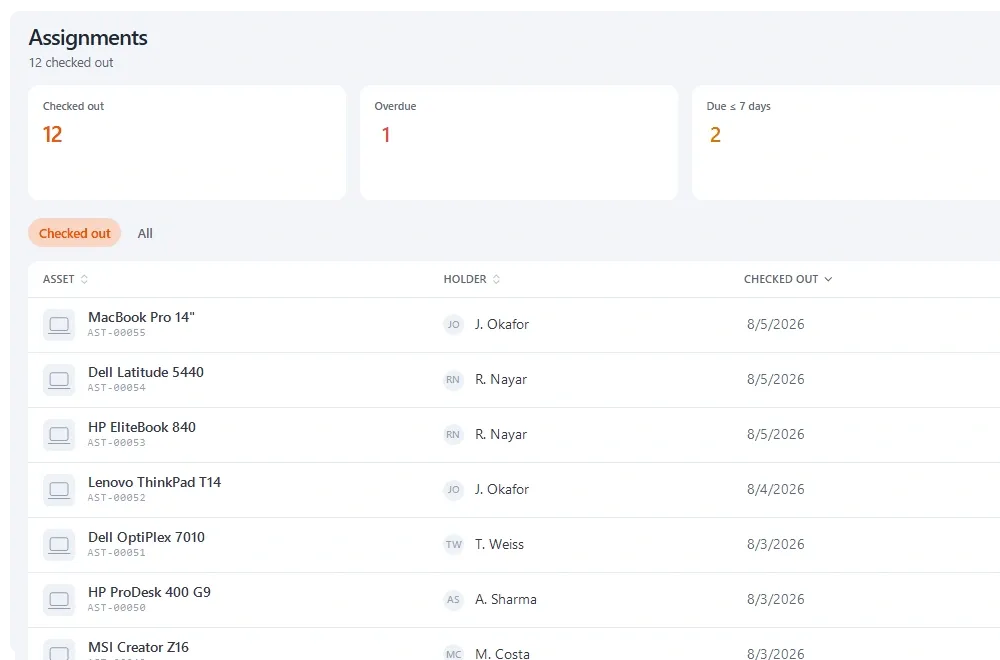
*The facts a single spreadsheet cell can't hold: who, when, accepted, condition and what came before.*
The costs of staying
A spreadsheet's price is zero, which is why the comparison usually stops there. The costs show up elsewhere:
- Maintenance time. Someone keeps it current, and the effort grows with the number of items and people.
- Reconciliation. Versions that disagree have to be resolved, usually at the worst moment, such as the week before an audit.
- Searching. When nobody trusts the sheet, people go and look instead, and the sheet gets less accurate because nobody updates it.
- Key-person risk. It's accurate because one person keeps it accurate, which you find out the week they leave.
- Missed claims. Without expiry alerts, cover lapses or a repair gets paid for while still under warranty.
None of these is a reason to switch on its own. Together, they're why the switch usually happens, and it tends to happen after an incident rather than after an analysis. If you want to put numbers on them, asset tracking ROI shows how to measure them, and how much asset management software costs covers the other side of the comparison.
Decision checklist
Work through this with whoever maintains the sheet and whoever issues equipment. Count the yeses.
- Is equipment issued to named people, including to take home?
- Do more than two people need to update the register?
- Has anyone asked "who has it?" in the last month and not got a quick answer?
- Do teams share items that need booking?
- Do any items have warranty, service or inspection dates you need to act on?
- Has an auditor, insurer, funder or client asked for a verified count, or are they likely to?
- Do you need to show who had an item on a past date?
- Are items spread across more than one site or room?
- Do you have staff who work remotely with company equipment?
- Would the register fall apart if its main maintainer left tomorrow?
As a rule of thumb: zero to two yeses, stay on the spreadsheet and tighten it up using the steps below. Three or four, run a trial of a dedicated tool alongside it. Five or more, you've probably outgrown it already.
If you're staying on a spreadsheet, make it a better one
Staying put is a legitimate choice. A few habits make a spreadsheet register much more reliable:
- Give every item a unique asset ID and put it on a label. Duplicate rows usually start where there was no ID.
- Use drop-down lists for category, location and status so the same thing isn't spelled three ways.
- Keep a separate movements tab where each handover or return is a new row with date, person and condition. Never overwrite it; add to it.
- Don't delete rows for disposed items. Mark them disposed with a date and reason, so the item's history stays visible.
- Save a dated copy each month somewhere people can't edit, so you have snapshots that can't be reset.
- Count something physically every quarter, even one room, and record the result. The asset audit guide explains how to run a small count.
Our free fixed asset register template is laid out this way and gives you a clean structure to start from.
The middle option
It isn't spreadsheet or full platform. Several tools have free tiers that will hold a small register properly, with custody and signatures, so you can run both for a month. Keep the spreadsheet as the record, load the same data into a tool, and see which one people actually keep up to date. That settles the question with evidence, and it costs nothing but an import.
Your spreadsheet is your head start
People put off switching because they think they'll have to start again. You don't: your spreadsheet becomes the import file. In Stackroom, for example, you export the sheet to CSV, map your columns once, and categories, locations and departments are created from the values already in your file. The guide to importing assets with a CSV covers the details.
Two things are worth doing before you import. Decide whether your current category structure is the one you actually want, because migration is the cheapest moment to change it. And spot-check twenty records against reality, so you know how much drift you're carrying over.
Read your spreadsheet as evidence
The shape of a spreadsheet tells you what people actually needed from it.
|
What you find |
What it means |
What to do |
|---|---|---|
|
A colour-coded status column |
Status mattered and had no proper field |
Map it to a real status field |
|
Notes like "with Dave?" |
Custody was the real need |
This is why you're switching |
|
Duplicate rows for the same item |
No unique identifier existed |
Deduplicate before import, not after |
|
A tab per site |
You need hierarchical locations |
Build the hierarchy from the tab names |
|
Blank rows and subtotals |
It was doubling as a report |
Leave them behind; reports come from the tool now |
Running the switch without a bad week
- Import while the spreadsheet stays authoritative. Nobody changes how they work yet.
- Pick one team or location to go first. A single group using it properly is a better argument than a memo.
- Run both for two weeks. Where they disagree, the reason is usually a process gap worth understanding, not a typo to fix quietly.
- Then make the tool the record and set the spreadsheet to read-only rather than deleting it. People will want somewhere to check for a while.
The parallel run is the step people skip, and it's the one that surfaces the unwritten rules your spreadsheet held: abbreviations only one person understands, the colour that means something, the rows at the bottom that aren't really assets.
When to stay put
- Nothing is issued to anybody; items have a place, not a holder.
- One person maintains it, and that's stable.
- No dates that matter, or few enough to manage with reminders.
- Nobody outside has ever asked you to prove anything.
If that's you, save your money and use the checklist again in six months. The first signal usually arrives as an incident rather than a realisation, so it helps to know what you're watching for.
Sources
- Spreadsheet Errors: What We Know. What We Think We Can Do — Raymond R. Panko, Proceedings of EuSpRIG, 2000
- Show changes made in a workbook — Microsoft Support
- Get help with Show Changes in Excel — Microsoft Support
- Find what's changed in a file — Google Docs Editors Help
- How long should I keep records? — Internal Revenue Service
- Running a limited company: company and accounting records — GOV.UK
Key takeaways
- A spreadsheet is fine while items stay put, one person maintains it and nobody external needs proof.
- Panko's 2000 review found errors in at least 86% of spreadsheets in the more rigorous field audits, and builders badly underestimated their own error rates.
- Excel's Show Changes and Google Sheets' edit history miss formatting and some structural changes, and can be cleared or merged.
- Custody breaks first: a cell holds one overwritten name, with no date, acceptance or condition.
- Use the ten-question checklist: five or more yeses usually means you've outgrown the spreadsheet.
- Your spreadsheet becomes the import file, so clean it and rethink categories before you migrate.
Frequently asked questions
Can I use Excel for asset management?
Yes, for a small, stable set of items that rarely change hands and where nobody outside needs proof. Excel stops working well once equipment is issued to people, because a cell can't record that someone accepted an item, its change history misses formatting and can be cleared, and nobody can update it from where the equipment actually is.
How common are spreadsheet errors?
Very common, according to Raymond Panko's research. His 2000 review of field audits found errors in at least 86% of spreadsheets examined by the more rigorous audits, with 1.1% to 2.5% of cells containing errors in the most thorough ones. In one experiment, builders estimated a 10% chance of error while 86% had actually made one. Most studied spreadsheets were formula-heavy models rather than registers.
Does Excel keep an audit trail of changes?
Partly. Excel's Show Changes lists edits to cell values and formulas from the past 365 days, with who made them. Microsoft says it doesn't show formatting, chart, PivotTable, hiding or filtering changes, that edits in older Excel versions clear it, and that Reset Changes in Excel for the web clears the history for everyone. Version history remains, but it isn't a custody record.
When should we move from a spreadsheet to asset management software?
When equipment starts being issued to named people, when more than two people need to update the register, when teams need to book shared items, when warranty or inspection dates start to matter, or when an auditor or insurer asks for a verified count. If five or more of our ten checklist questions get a yes, you've probably outgrown the spreadsheet.
Will we lose our spreadsheet data if we switch?
No. Your spreadsheet becomes the import file. In most tools you export it to CSV and map each column to a field; in Stackroom, categories, locations and departments are created from the values already in your file. Spot-check about twenty records against reality first and remove duplicates, so you know how much drift you're carrying over.
How can I make an asset spreadsheet more reliable?
Give every item a unique ID on a label, use drop-down lists for category, location and status, and record handovers on a separate movements tab where each one is a new row. Mark disposed items rather than deleting rows, save a dated read-only copy each month, and physically count part of the register every quarter.