
IT asset management
Stackroom vs InvGate
InvGate Asset Management is a strong IT asset platform with agent-based discovery, software normalisation and a well-integrated service desk. Stackroom covers the physical layer instead: custody, signatures, bookings, maintenance and audits, across equipment that is not necessarily IT.
Stackroom vs InvGate: which should you choose?
InvGate is the better choice for managing an IT device estate with automated discovery, software inventory and an integrated service desk. Stackroom is the better choice for physically tracking equipment that people carry, share and return — including tools and instruments that never appear in a discovery scan.
Side by side
Stackroom vs InvGate: pricing, limits and features
Grouped so you can jump to the part you care about. Our figures come from our billing API, so they match the invoice.
Pricing & plans
Free plan
- Stackroom
- Free forever — 250 assets, 500 people, unlimited users, no card
- InvGate
- None — free trial only (Free trial, no card required)
Paid plans start at
- Stackroom
- $0/mo for Starter — published, self-serve
- InvGate
- A fixed annual price covers the first five agents; the tier above is priced per agent per year with an annual floor; Enterprise starts several times higher again.
How the bill scales
- Stackroom
- Capability and capacity — never headcount, never how much you track
- InvGate
- Agent count. End users and approvers are unlimited and free; the bill is the number of people working tickets.
Limits
Asset limits
- Stackroom
- 250 free, up to 10,000 on Premium, custom on Enterprise
- InvGate
- Not published as a licensing dimension for Service Management
Users & seats
- Stackroom
- Unlimited on every plan, including Free — seats are never the meter
- InvGate
- Unlimited end users and approvers · 5 agents fixed · 5–50 agents per-agent · Enterprise any number
Locations & sites
- Stackroom
- 1 on Free, unlimited on every paid plan
- InvGate
- Not published
How each tool is set up
Self-serve free tier
- Stackroom
- Yes
- InvGate
- No
What each tool covers
Beyond IT equipment
- Stackroom
- Any asset type
- InvGate
- IT-oriented
Custody & accountability
Signed handover & return
- Stackroom
- Yes
- InvGate
- Assignment
Asset clearance certificate for leavers
- Stackroom
- Yes
- InvGate
- No
Signed webhooks with retries
- Stackroom
- 41 events, HMAC-signed, retried
- InvGate
- Not stated on their pricing page
Audits & compliance
Scoped cycle-count audits
- Stackroom
- Yes
- InvGate
- Basic
Maintenance & service
AMC / CMC service contracts
- Stackroom
- Yes
- InvGate
- Contracts
Finance & lifecycle
Depreciation (SLM / WDV) & book value
- Stackroom
- Yes
- InvGate
- Yes
Tracking & tagging
Agent-based IT discovery
- Stackroom
- No
- InvGate
- Its strength
Bookings & reservations
- Stackroom
- Yes
- InvGate
- No
Geo scan map & per-asset trail
- Stackroom
- Yes
- InvGate
- No
Platform, API & AI
Software asset management
- Stackroom
- No
- InvGate
- Its strength
REST API
- Stackroom
- Documented, with a published OpenAPI spec
- InvGate
- Not stated on their pricing page
Built-in AI assistant
- Stackroom
- Stackroom AI, role-scoped
- InvGate
- AI Hub on entry; AI service agent second tier and up
| Capability | Stackroom | InvGate |
|---|---|---|
| Pricing & plans | ||
| Free plan | Free forever — 250 assets, 500 people, unlimited users, no card | None — free trial only (Free trial, no card required) |
| Paid plans start at | $0/mo for Starter — published, self-serve | A fixed annual price covers the first five agents; the tier above is priced per agent per year with an annual floor; Enterprise starts several times higher again. |
| How the bill scales | Capability and capacity — never headcount, never how much you track | Agent count. End users and approvers are unlimited and free; the bill is the number of people working tickets. |
| Limits | ||
| Asset limits | 250 free, up to 10,000 on Premium, custom on Enterprise | Not published as a licensing dimension for Service Management |
| Users & seats | Unlimited on every plan, including Free — seats are never the meter | Unlimited end users and approvers · 5 agents fixed · 5–50 agents per-agent · Enterprise any number |
| Locations & sites | 1 on Free, unlimited on every paid plan | Not published |
| How each tool is set up | ||
| Self-serve free tier | Yes | No |
| What each tool covers | ||
| Beyond IT equipment | Any asset type | IT-oriented |
| Custody & accountability | ||
| Signed handover & return | Yes | Assignment |
| Asset clearance certificate for leavers | Yes | No |
| Signed webhooks with retries | 41 events, HMAC-signed, retried | Not stated on their pricing page |
| Audits & compliance | ||
| Scoped cycle-count audits | Yes | Basic |
| Maintenance & service | ||
| AMC / CMC service contracts | Yes | Contracts |
| Finance & lifecycle | ||
| Depreciation (SLM / WDV) & book value | Yes | Yes |
| Tracking & tagging | ||
| Agent-based IT discovery | No | Its strength |
| Bookings & reservations | Yes | No |
| Geo scan map & per-asset trail | Yes | No |
| Platform, API & AI | ||
| Software asset management | No | Its strength |
| REST API | Documented, with a published OpenAPI spec | Not stated on their pricing page |
| Built-in AI assistant | Stackroom AI, role-scoped | AI Hub on entry; AI service agent second tier and up |
Honest take: InvGate leads on IT discovery, software asset management and ITSM integration. Stackroom leads on physical custody and non-IT equipment.
InvGate capabilities verified September 2026 · plan facts read from their pricing page , September 2026. Spotted something out of date? Tell us.
Plan gating
Which tier unlocks what
What you have to be paying for before each capability is available.
- CSV importStarter and up
- Barcode & QR scanningStarter and up
- Bookings & reservationsStarter and up
- Maintenance & serviceStarter and up
- Cycle-count auditsGrowth and up
- Report libraryGrowth and up
- Custom fieldsGrowth and up
- Stackroom AIFree and up
- REST APIGrowth and up
- Signed webhooksGrowth and up
- Custom rolesGrowth and up
- Google / Microsoft SSOFree and up
- Workflow builder and the AI service agent — second tier and above
- Concurrent seats, on-premise hosting and multiple SAML — Enterprise only
InvGate prices the people working tickets, which is coherent for a service desk. It is priced for an IT team with agents, not for an operations lead whose staff issue equipment rather than resolve tickets.
The difference
What Stackroom and InvGate are each built to do
Two tools with almost no functional overlap
InvGate is IT asset management in the full sense: agents on endpoints reporting hardware and installed software, normalisation so you can see what you actually run, licence reconciliation, and a service desk that shares the same data.
Stackroom does none of that and will not pretend otherwise. There is no agent, no discovery, no software inventory. What Stackroom knows about an asset is what someone recorded or scanned.
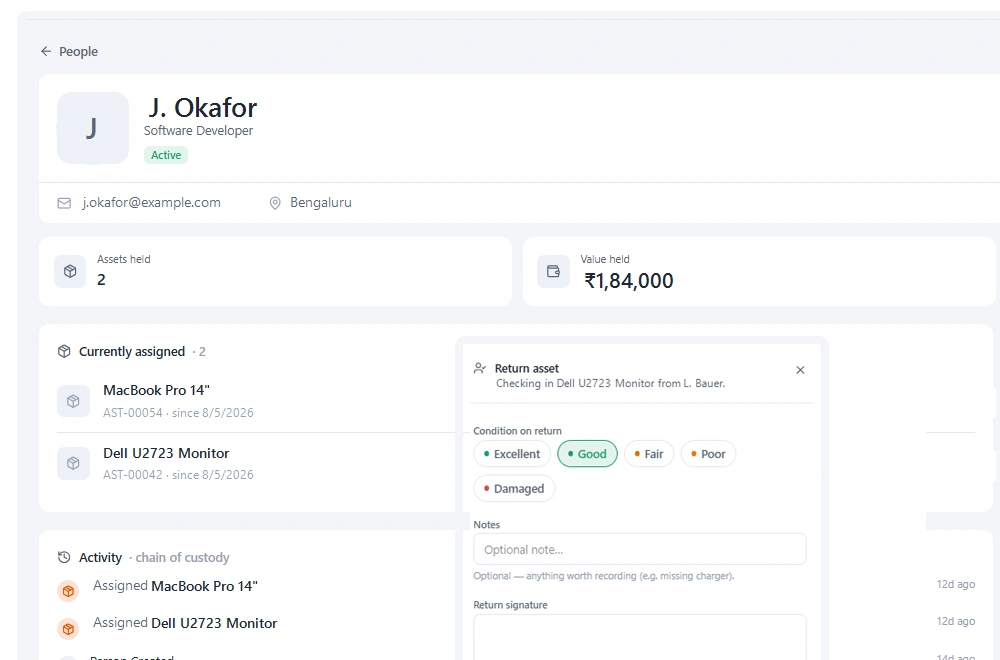
The counterpart is that Stackroom knows things InvGate cannot: that this item is currently held by Priya, that she signed for it on the twelfth, that it was last scanned at the Bristol central store, that it is booked to another team on Friday and is due a service inspection first.
Deployment shape
Agent-based platforms carry a deployment project: endpoints to reach, policies to agree, exclusions to handle, a rollout plan. That is normal and worth it for the visibility it buys, but it means the tool proves its value in months rather than days.
Stackroom's equivalent is printing labels. Sign up, import a CSV, print a sheet of QR codes, and start scanning. The free tier means the evaluation costs nothing but an afternoon, which suits an operations lead who needs to prove an idea internally before anyone will fund it.
Who is actually asking
A useful way to decide: who in your organisation is pushing for this. If it is IT, and the pain is licence compliance, patch posture or not knowing what is deployed, InvGate is aimed squarely at that and Stackroom is not.
If it is operations, facilities, a lab manager or a office manager, and the pain is that equipment walks off, gets double-booked, or comes back broken with nobody accountable — that is Stackroom's problem and an ITAM platform will feel like a poor fit no matter how capable it is.
Why teams switch
What we hear from teams leaving InvGate
The problem was physical, not digital
Discovery answers what exists on the network. It does not answer who walked out with the thermal camera.
Operations needed their own tool
When the people with the problem are not IT, an IT-shaped platform is hard to adopt regardless of how good it is.
They needed to start this week
An agent rollout is a project. Printing labels and importing a CSV is an afternoon, and sometimes that difference decides whether anything happens at all.
The other side
When InvGate is the better choice
We would rather you picked the right tool than picked ours.
- You need agent-based discovery and installed-software inventory.
- Software licence compliance and normalisation are real requirements.
- You want ITAM and a service desk from the same vendor, sharing data.
- IT owns the problem and the budget, and the estate is IT equipment.
Switching
Moving from InvGate
- 1
Export from InvGate
Take a full CSV export of your asset list, including serial numbers, categories, locations and any custom fields you rely on — if InvGate only offers XLSX, save it as CSV, because that is what the importer reads. Export your people list separately if InvGate keeps one.
- 2
Map the columns once
The importer previews your file and lets you map each column to a Stackroom field. Categories, locations and departments are created from the values in your file, so you do not build the hierarchy by hand first.
- 3
Import people, then assets
Loading people first means custody assignments resolve to a real person on the asset import rather than needing a second pass.
- 4
Check a sample, then go
Spot-check twenty records against the old system before you invite the team. Re-importing is safe — matching on an existing code updates rather than duplicates.
Nothing is deleted from InvGate by importing into Stackroom, so you can run both in parallel for a week while people get used to the change.
FAQ
Questions, answered
Is Stackroom an ITAM tool?
Only in the physical sense. Stackroom tracks IT equipment as objects — assigned, signed for, returned, serviced — but has no discovery, no software inventory and no licence reconciliation.
Can we run InvGate and Stackroom together?
Yes. InvGate for the networked estate and software, Stackroom for physical custody and everything that never appears in a scan. The REST API keeps shared records aligned.
Why would an IT team choose Stackroom?
Usually for onboarding handovers with signatures, offboarding recovery lists, and tracking the non-networked tail — monitors, docks, adaptors, headsets — that discovery cannot see.
Can we try Stackroom without a sales process?
Yes. The free tier is self-serve: sign up, import, print labels, run a real checkout. No demo required.
Can we import our data from InvGate?
Yes. Export your inventory to CSV and import it into Stackroom. Categories, locations and custom fields map across, and our team will help with the awkward parts of a larger migration.
How long does switching actually take?
Most teams import in the morning and run a real checkout the same afternoon. There is no implementation project and no professional services fee. The longest part is usually relabelling, and that can be done gradually.
Do we have to relabel everything?
No. If your existing labels carry a code you already track, import that code and keep using them. New QR labels can be printed on standard address stock as and when you need them.
Is InvGate free?
No. InvGate has no free plan, only a free trial — free trial, no card required. Stackroom has a permanent free plan with unlimited users and no card required.
How is InvGate priced compared with Stackroom?
Agent count. End users and approvers are unlimited and free; the bill is the number of people working tickets. Stackroom prices on capability and capacity instead: users are unlimited on every plan, and tracking more equipment never moves the bill on its own.
What are the InvGate asset and user limits?
Assets: Not published as a licensing dimension for Service Management. Users: Unlimited end users and approvers · 5 agents fixed · 5–50 agents per-agent · Enterprise any number. Locations: Not published. Every Stackroom limit is published on our pricing page and served from our billing API, so it matches your invoice.
Other comparisons
Looking at something else?
Outgrowing InvGate?
Import your data, print a sheet of labels, and run a real checkout the same day.